How LootLink's Scanner Identifies a Card: Step-by-Step Technical Guide
Point your camera at a card, and LootLink identifies it in about a second. But what actually happens behind the scenes in those split seconds? Discover how LootLink combines on-device AI models, local text extraction, and compact neural artwork fingerprints – without uploading your photos.
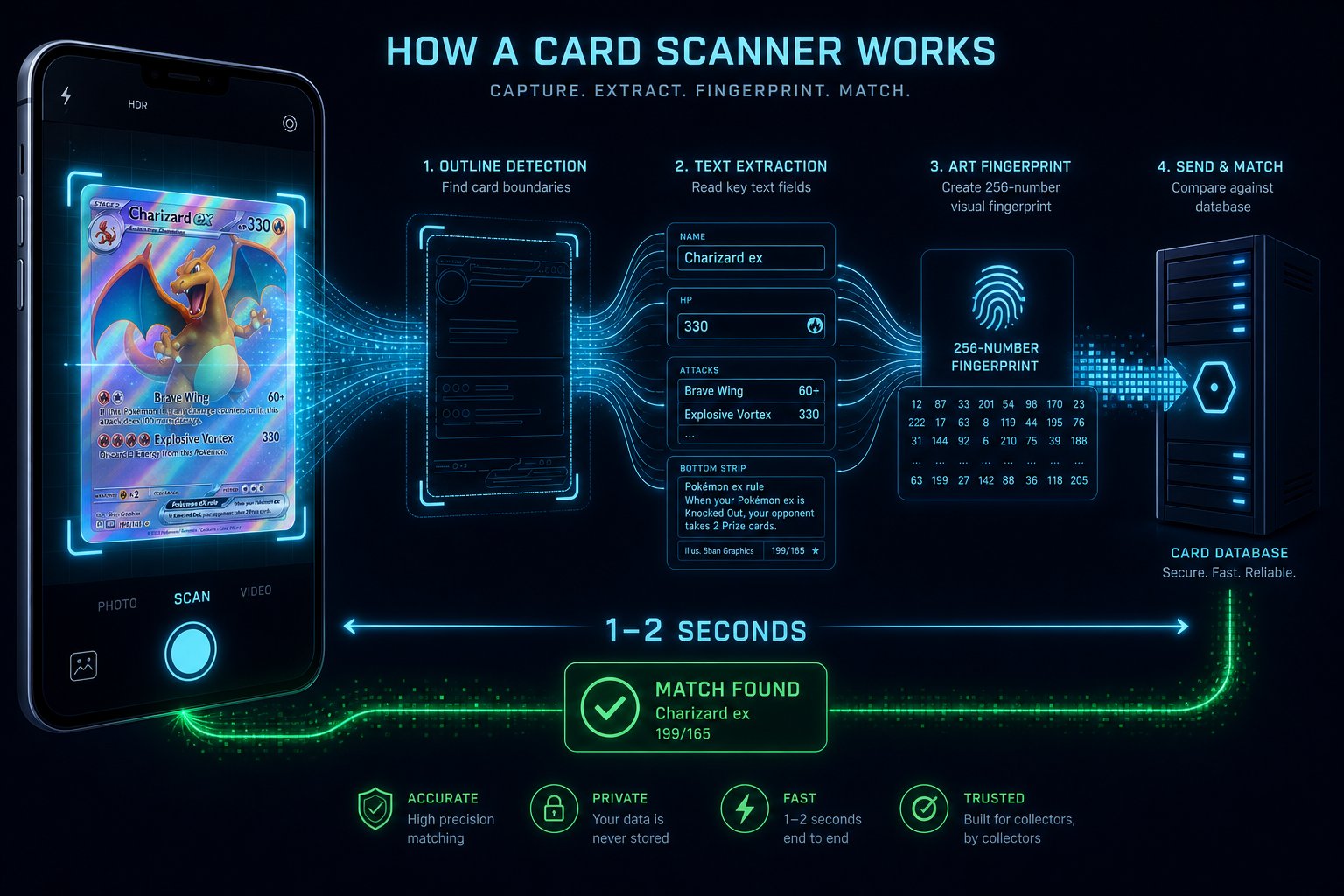
Step 1: On-Device Card Boundary & Perspective Detection (10–15 FPS)
When you open the camera scanner in LootLink, the application immediately activates the local camera analysis module. A specialized neural detection model runs continuously on your smartphone's processor, analyzing incoming camera video frames at a rate of 10 to 15 frames per second.
Within fractions of a second, this module performs several real-time quality checks:
- Boundary & Quad Detection: The local model locates the four corners of a trading card within the camera frame and calculates its geometry.
- Sharpness & Blur Validation (Laplacian Variance): Using mathematical edge variance analysis, the app measures image sharpness. Blurry or motion-distorted frames are automatically filtered out before processing power is wasted.
- Tilt Gate Validation: If the card is angled too steeply (>10 degrees), the app displays an alignment prompt guiding you to hold the phone steady and avoid geometric skew.
- Perspective Transformation: Once a sharp, aligned frame is captured, the module crops the card boundaries and performs on-device perspective correction to flatten the image.
Intelligent Pre-Filtering for Instantaneous Match Accuracy
An essential aspect of LootLink's scanning speed is our real-time image quality validation. Rather than blindly processing blurry camera frames, the app evaluates edge sharpness and camera orientation 15 times per second. The identification pipeline triggers only when a video frame satisfies strict sharpness and alignment parameters. This mathematical pre-filtering eliminates false positives, conserves battery power, and guarantees that you receive an accurate match result on your screen in about a second.
Step 2: Spatial Optical Text Extraction on Key Regions
Following perspective correction, the integrated optical character recognition (OCR) module takes over. Instead of scanning the entire image blindly, LootLink targets two specific spatial regions on the card:
- Top Title Region: Reads the exact card name (e.g., Grolldra or Charizard).
- Bottom-Left Collector Region: Reads the printed set abbreviation and collector number (e.g., TWM 129/167).
By restricting OCR to these specific regions, irrelevant body text, ability descriptions, and fluff words are ignored. This entire text extraction pipeline executes locally on your phone's processor. Not a single byte of data has been sent to any external network yet.
Step 3: 256-Dimensional Neural Artwork Fingerprinting & Vector Search
Text extraction alone is not always sufficient for unambiguous identification: Foil reflections on holographic cards can obscure printed text, promo editions often share collector numbers across sets, or text may be printed in an unfamiliar language. To guarantee 100% identification accuracy, LootLink generates a 256-dimensional neural artwork fingerprint.
An on-device visual embedding model analyzes the structural composition, color distribution, and artwork patterns of the card image, converting it into a compact vector of exactly 256 numbers. This vector captures the visual identity of the artwork perfectly, but contains zero reconstructible pixel data from your original camera photo.
At this point, LootLink transmits a lightweight data payload to the LootLink lookup service:
{
  "title": "Grolldra",
  "set": "TWM",
  "collectorNumber": "129/167",
  "artworkVector": [0.12, -0.45, 0.88, ... 256 values]
}
The server compares this compact payload against the central card catalog in milliseconds using high-performance vector indexing (pgvector), returning the exact matching card record (including Cardmarket price trends and variant options). The entire end-to-end process takes just 1 to 2 seconds – and your camera photo never left your phone.
Dual Redundancy for Challenging Lighting & Venue Conditions
In real-world collecting environments, ideal studio lighting is rare. Scans frequently occur under harsh convention hall spotlights or dim ambient room light. LootLink's identification architecture is specifically engineered for these real-world challenges. When intense holographic glare obscures printed text tokens, the system gracefully shifts reliance onto the secondary signal: the 256-dimensional artwork vector. Visual artwork composition remains distinguishable even under glare, ensuring consistent match accuracy anywhere.
Step 4: Local Storage & Instant Offline Persistence
The instant the match result arrives on your screen, LootLink stores the card metadata, image paths, variant options, and current Cardmarket price snapshots directly in your phone's local database.
From that moment on, the card is permanently available offline. You can organize it into binders, add custom acquisition notes, adjust condition grades, and track its value – regardless of whether you have internet access in the future.
Experience the Future of Card Identification
Lightning-fast, highly accurate, and completely private. The LootLink scanner combines local AI processing with intelligent server lookup for the ultimate scanning experience.
Follow us on Threads or Instagram – we post go-live updates and launch news there.
Why is combining text recognition with an artwork fingerprint so much more accurate than photo search alone?
Photo-only search often fails due to glare on holographic foils, varied lighting, or identical artwork reprinted across different sets. LootLink combines the exact printed set number with neural artwork pattern matching. This guarantees 100% accurate identification, even for complex promo printings and set reprints.
Why does my camera photo never leave my smartphone during identification?
Because heavy computer vision tasks – corner detection, text extraction, and artwork vector generation – run locally on your phone using optimized AI models. Only the resulting abstract text and 256-number vector are sent to the LootLink service for database lookup – never the raw camera photo.